Enterprise virtualization migration solutions in 2026: what IT leaders need to know
Nobody wants to deal with a platform migration. It’s one of those things IT teams dread, right up there with surprise audits and Monday morning outages. But here’s the thing: if you’re still running on a legacy server virtualization setup, the cost of staying put is starting to outweigh the pain of moving.
Licensing fees have gone through the roof. Vendor lock-in is tighter than ever. And if you’re planning to scale into hybrid cloud or edge deployments, some of those older platforms just weren’t built for that world.
Enterprise virtualization migration solutions have come a long way, and today, switching hypervisors doesn’t have to mean months of downtime and a team of consultants burning through your budget.
This post breaks down what a smart migration actually looks like, and why platforms like Sangfor HCI are making the VMware replacement conversation a lot less scary.
The Real Problem with Legacy Server Virtualization
If you’ve been on the same server virtualization stack for several years, you’ve probably felt the squeeze.
The licensing model that made sense back then doesn’t look so great now. Some vendors have moved to subscription-based pricing, which means what you used to pay once, you’re now paying for annually, and the numbers add up fast.
According to Gartner, around 70% of enterprises are actively exploring alternatives to their current virtualization platforms. That’s not a small group of early adopters. That’s the mainstream IT world quietly shopping around.
The support lifecycle issue is another one of the main issues with legacy systems. Let’s say a maintenance issue occurs, and you reach the end of support. Now, you’re looking at two options. Either you pay for extra coverage or struggle to migrate under pressure.
That’s not a great position to be in for enterprise IT leaders. Now add other issues like hardware dependencies, complex requirements for scalability, and the overhead cost of managing a fragmented stack across on-prem and cloud. That’s the recipe for a higher cost for the same return that an enterprise can gain using modern virtualization.
What a Solid Migration Plan Actually Looks Like
Yes, legacy systems are outdated, and switching to a modern virtualization platform is a smart decision from multiple points of view. But that’s where many enterprises make a grave mistake. They jump in without a plan, and things get messy.
The good news is that a handful of virtualization vendors provide guided roadmaps for a smooth transition. They lay out a framework for your organization to use and follow without any guesswork.
Here’s the basic flow:
Start with an audit. Map out your workload, dependencies, performance baseline, and other factors that may cause downstream issues.
Choose a vendor that suits your needs, and align with the findings from the audit. Now, plan out the migration with compatibility analysis, identifying risks, and mapping out a phased approach.
Phased cutover is almost always the right call. You move workloads in batches, monitor performance, and validate before touching the next group.
Post-migration isn’t the end. You tune the environment for the new platform, take advantage of HCI-specific efficiencies, and clean up anything that got carried over from the old setup.
Validation: Test everything. Have rollback safeguards in place. Don’t assume it worked just because nothing broke immediately.
It sounds straightforward, and with the right migration tools, it actually can be. The key is working with a platform that supports guided migration natively, not one that leaves you writing custom scripts at 2 a.m.
What are the essential elements of a successful enterprise virtualization migration?
A solid migration plan starts with workload discovery and dependency mapping, followed by phased cutover and post‑migration optimization. Sangfor HCI supports this approach with guided assessments, automated migration tools, and validation workflows that reduce risk throughout the transition.
Sangfor HCI: One of the Leading Enterprise Virtualization Migration Solutions
Sangfor HCI has been making noise in the hyperconverged space for good reason. Beyond just being a solid virtualization platform, it’s built with migration in mind. You get automated discovery, live migration wizards, and zero-touch physical-to-virtual (P2V) and virtual-to-virtual (V2V) conversions, all without needing to write a line of custom code. It ensures efficient data replication, encryption, compression, and bandwidth control. With flexible migration strategies and minimal service interruption, it optimizes cost and benefits for any business.
That last part matters more than people realize. A lot of consulting engagements for server virtualization migrations turn into extended engagements because the tooling isn’t mature enough. Sangfor’s migration tools cut that overhead significantly.
The licensing model is also a breath of fresh air. Perpetual licenses, no hidden fees, predictable pricing, it’s the kind of transparency that makes IT budgeting actually possible.
Real-world enterprise deployments have seen cost reductions of 50% or more compared to their previous stack. That’s not marketing language; that’s what happens when you strip out the licensing complexity.
Why is Sangfor HCI particularly suited for large‑scale virtualization migrations?
Sangfor HCI is built with migration at the core, offering native P2V and V2V tools, automated discovery, and live migration capabilities without third‑party scripts. Combined with perpetual licensing and integrated security, it removes many of the operational and financial blockers enterprises face when switching platforms.
How Do You Migrate from VMware to Another Hypervisor Without Downtime?
This is the question that comes up in almost every VMware replacement conversation. And the honest answer used to be: you can’t, not without some downtime. But that’s changed.
Sangfor’s Live Migration tool handles this with agentless replication and predictive analytics that monitor the migration process in real time.
You can shift workloads while they’re running, validate the destination environment, and then cut over during a window that works for your business, often measured in minutes, not hours.
The recommended starting point? Take advantage of Sangfor’s free migration assessment service. They’ll map out your current environment, identify potential issues, and give you a concrete roadmap before anything moves. That kind of upfront consulting is worth its weight in avoided headaches.
Is zero‑ or near‑zero‑downtime migration away from VMware realistically possible?
Sangfor HCI enables seamlessly live migration using agentless replication, allowing workloads to move while running, validate on the destination, and cut over in tightly controlled windows—often measured in minutes rather than hours.
What Is the Best Virtualization Platform for Enterprise Migration in 2026?
Sangfor HCI checks all the boxes if the priorities are cost, scalability, security, and ease of management. However, it depends on what you’re optimizing for.
Unified management across compute, storage, and networking. Built-in ransomware protection. Multi-cloud support. And a migration path that doesn’t require a third-party consulting firm just to get
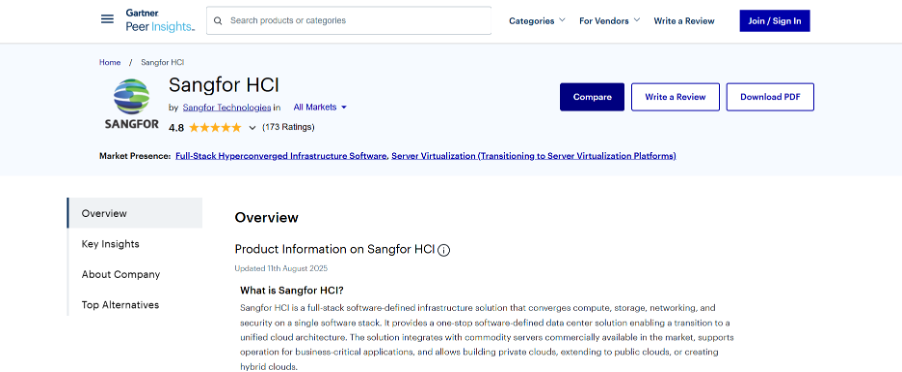
On independent review platforms, Sangfor HCI scores 4.7/5 on G2 and 4.8/5 on Gartner for, with users consistently highlighting migration simplicity and stable virtualization performance.
Nishat Emporium Mall, one of Pakistan’s largest retail and entertainment complexes, migrated its VMware environment to Sangfor HCI to address availability gaps and manual operations. It delivered centralized management, built‑in high availability, and simplified virtualization without disrupting live business operations.
Best Practices for a Low-Risk Vendor Switch
Even with great tooling, migrations can go sideways if you skip the fundamentals. A few things worth putting on your pre-migration checklist:
Back up everything before the first workload moves. Not just the obvious VMs, configuration files, network settings, and application dependencies.
Segment your network properly. Don’t migrate into a flat network topology if you can avoid it; use the migration as an opportunity to clean things up.
Check compliance requirements for any regulated workloads. Healthcare, finance, and government environments have specific considerations that need to be addressed before the first VM moves.
Don’t underestimate data transfer times. Large environments with terabytes of storage take longer than expected. Build that into the timeline.
Use intent-based networking if the platform supports it. Sangfor HCI’s networking features can automate failover scenarios that would otherwise require manual configuration.
Common mistakes? Ignoring application dependencies is the big one. You can migrate a VM successfully and still break an application because a dependency, a database, a licensing server, or a shared storage volume didn’t come along for the ride.
Switch with Clarity
The best part of a migration from legacy infrastructures to a modern hyperconverged infrastructure is the pace of the transition. Now, enterprises need not spend a year just migrating from VMware or any other platform to newer vendors with more transparent licensing models. The right system, migration tools, and a step-by-step plan make it doable, even for tricky setups.
Sangfor HCI offers guided migration help, clear licensing, and a modern architecture that combines well. If high licensing costs are stressing you out or your current system is about to become outdated, now is a time to explore alternatives.
You can book a consultation with Sangfor to discuss migration or get their HCI migration guide to see how it works for environments like yours. Changing to a server virtualization platform doesn’t have to hurt. It just needs a solid plan and the right support team.