How do retailers handle unexpected hardware failures without disrupting sales?
When a checkout terminal freezes, or a barcode scanner stops reading, a retail business can lose more than just minutes - it can lose trust. Hardware failures rarely announce themselves, and even a two-hour downtime during peak hours can translate into hundreds or thousands of dollars in missed sales.
For small retailers, the chain reaction is immediate: queues stretch, card payments stall, and customers walk away. Understanding what breaks first, how to react, and how to prevent a total stop at the register is what separates chaos from control.
Why Unexpected Hardware Failures Become a Same-Day Sales Risk
In small retail setups, the weakest links are usually the devices that work the hardest - PoS terminals, card readers, network switches, barcode scanners, and receipt printers. They operate under constant pressure, exposed to heat, dust, and high transaction volumes. The first signs of wear often appear subtle: delayed card reads, printer jams, or random reboots. Yet when these symptoms are ignored, a complete failure can shut down sales within hours.
According to World Bank research, every hour of system downtime can reduce small-business daily revenue by several percent, especially in urban retail environments. The implication is clear: even short outages distort weekly cash flow and threaten payroll or supplier payments.
Early warning signs that justify pre-emptive replacement:
● Repeated error codes or forced reboots
● Frequent payment retries or slow card responses
● Overheating or unusual terminal noise
● Printer jams or misaligned receipts
● Barcode scanner disconnects without a visible cause
Monitoring and addressing these signs early costs far less than emergency replacements during a holiday rush.
The First 60 Minutes: A Rapid Response Checklist That Protects Revenue
When a breakdown strikes, what happens in the first hour defines the outcome. The goal isn’t only to fix the issue but to keep transactions moving.
Step 1: Isolate the fault quickly
Determine whether the failure is hardware, software, or network-related. Swap cables, reboot devices, and check the payment processor’s status page before assuming a full outage.
Step 2: Switch to temporary trading mode
If one PoS terminal is down, activate an offline mode or use a backup device. When card payments fail, a manual imprint or phone-based payment app can bridge the gap. Even a short-term “cash-only” protocol is better than losing customers.
Step 3: Communicate clearly
A printed sign - “Card payments temporarily offline; cash welcome” - reduces frustration. Staff should have a unified script to explain the situation and reassure customers that checkout will continue.
Step 4: Divide roles during peak time
One employee troubleshoots, another manages queues, and one assists with manual transactions. It keeps order and maintains professionalism under pressure.
Do / Don’t actions during peak traffic:
● Do keep at least one terminal running, even if lanes must be rearranged.
● Do record manual transactions to sync later.
● Don’t reboot the store router in panic - isolate one component at a time.
● Don’t let staff debate solutions in front of customers - assign a single lead to the incident.
Backup Systems That Prevent a Full Stop at Checkout
Every retailer should keep a minimal “fallback kit.” It can mean the difference between a five-minute delay and a five-hour shutdown.
Recommended fallback kit by store type:
● Convenience stores: spare receipt printer, barcode scanner, surge protector, and backup internet hotspot.
● Gift shops: extra card reader, spare cables, and printed price lists for manual entry if scanners fail.
● Apparel boutiques: an additional PoS tablet preconfigured with the same software license, plus a mobile payment app as backup.
Beyond hardware, vendors’ support agreements deserve close attention. Many warranties include next business day replacements, but only if the issue is reported before a specific hour. Knowing those conditions in advance can halve downtime.
Data continuity is another defense line.
Synchronize sales and inventory data to the cloud daily, export a local backup weekly, and store credentials and license keys securely. When a terminal crashes, these steps allow an immediate switch to a spare unit without losing transaction records.
Fast Replacement Logistics Without Operational Chaos
Replacing critical checkout hardware within 24–72 hours sounds simple - until software compatibility and tax settings complicate it. To minimise disruption, every purchase should follow a checklist.
Compatibility essentials:
● PoS software version and supported hardware list
● Payment terminal pairing and encryption standards
● Driver availability for scanners and printers
● Region specific tax or receipt formatting
Plan installation around traffic
Schedule replacements during low traffic hours - late nights or early mornings. If multiple units require upgrades, replace one per shift to keep at least one terminal open.
Testing protocol before reopening:
● Run sample sales and refunds.
● Scan the full inventory to confirm sync.
● Check receipt layout and totals.
● Test card and contactless payments.
Completing these steps before reopening helps avoid “post-repair surprises” that frustrate customers and staff. A clear installation plan means the store recovers smoothly and sales remain uninterrupted.
Funding Urgent Replacements: Vendor Credit, Cash Reserves, and Liquidity Rules
When hardware collapses midweek, the next question isn’t “what failed?” but “how do we pay for it?” Retailers often learn that technical issues turn into instant financial stress. Choosing the right funding method determines how smoothly the store recovers.
Vendor credit is usually the fastest route. Established suppliers often offer short-term terms for replacement equipment, typically 15–30 days. For retailers with a consistent order history, these approvals arrive quickly and minimize downtime. Still, vendors’ trust should be treated like a limited resource — overusing it can quietly strain future cash flow.
Cash reserves make sense when timing aligns with payroll and supplier payments. Most small retailers maintain a two-week operating buffer, which should stay untouched for emergencies. Using that reserve for replacements is acceptable only if payroll and core expenses remain safe. When liquidity drops below the threshold, external financing becomes a more stable choice.
Liquidity triage helps prioritise what truly matters:
● Payroll
● Essential suppliers
● Rent and utilities
● Urgent hardware replacement
Everything else — decor, marketing, or nonessential upgrades — can wait until normal operations resume.
Decision matrix: vendor credit vs. cash reserves vs. financing
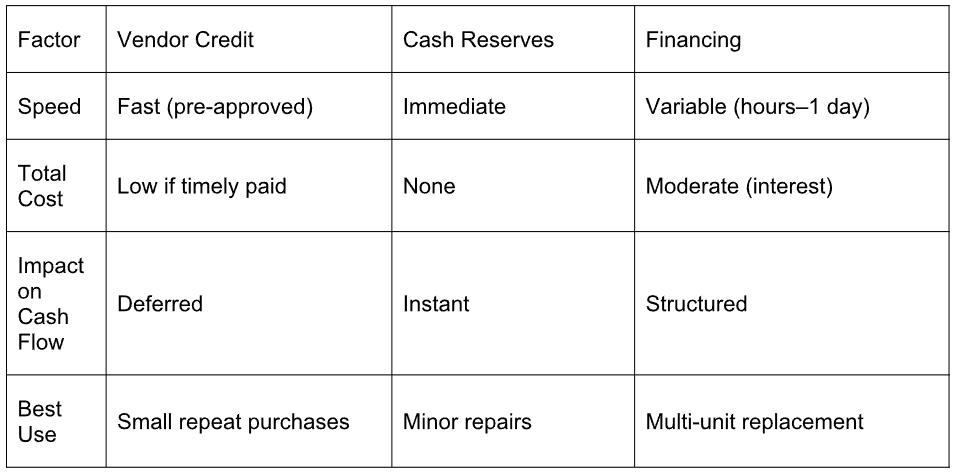
Knowing these options in advance allows store owners to act strategically instead of emotionally when something fails.
Case Examples: Three Retailers and Three Funding Paths
Real-world examples show how theory meets reality when hardware fails at the worst time. Each of these small retailers faced the same challenge - sudden equipment breakdowns and tight cash flow - but handled it through a different funding route. Their experiences reveal what works best when every minute of downtime costs revenue.
James Patel: POS Terminal Failure and Vendor Credit in 48 Hours
James Patel owns a small convenience store where checkout speed is the heartbeat of business. When his main PoS terminal froze during a Friday rush, the line backed up within minutes. Because he already had vendor credit preapproved, his supplier shipped a replacement overnight. The terminal was live by Sunday, proving that good supplier relations can serve as emergency credit.
Olivia Martinez: Scanners and Receipt Printers and a $2,400 Cash Reserves Decision
In Santa Fe, Olivia Martinez faced a pre-holiday nightmare: both scanners and receipt printers failed two days before her busiest weekend. The repair bill was $2,400. She dipped into her emergency fund but kept payroll and supplier cash intact. The result was smooth holiday trading and zero borrowing cost. Her rule now - only touch reserves when they cover at least two payroll cycles.
Daniel Brooks: Two Unstable POS Systems, Nearly $5,000, and a Liquidity Gap
Daniel Brooks, owner of a boutique apparel store, ran into dual system failures - two aging PoS units that started crashing during transactions. Replacement quotes, including setup and software migration, totaled nearly $5,000. Payroll and supplier payments were already due that week, leaving no liquidity buffer.
Instead of delaying repairs, Daniel contacted Loans Bear to explore short-term financing. His objective was not only to secure quick funding but also to calculate how much of his weekly sales he could allocate without touching payroll or supplier money. After analysing his sales cycle, he structured repayments around projected post-upgrade turnover, paid the supplier deposit right away, and completed installation before the weekend.
His case demonstrates that flexible financing can serve both as a recovery tool and as a structured liquidity solution — provided it’s planned using real cash flow data, not assumptions.
A Practical Playbook Retailers Can Copy for Their Own Store
Strong retailers don’t just react - they prepare. A well-defined checklist makes downtime predictable and recovery fast. Here’s a concise framework any store can adopt.
Pre-failure preparation (within one month):
● Create a list of all critical hardware with model numbers and vendor contacts.
● Keep one spare for high-risk components such as receipt printers.
● Verify warranty terms and response times with each supplier.
● Maintain a ready credit or small financing line for emergencies.
● Back up PoS configurations and licenses both to the cloud and to a secure drive.
Weekend protection routine:
● Print a test receipt and scan several items every Friday.
● Check the hotspot or backup internet function.
● Confirm software synchronisation across terminals.
● Run a test transaction and refund before closing.
Post-incident review checklist:
● Record time to detect, fix, and the cost of failure.
● Note which components failed and under what conditions.
● Evaluate vendor performance and responsiveness.
● Add the event to a training log for staff awareness.
30-Day Action Plan
● Week 1: Build a full hardware and vendor inventory.
● Week 2: Add one backup device for every two registers.
● Week 3: Draft a 24-hour repair protocol with staff roles.
● Week 4: Define your minimum cash buffer and validate financing options.
No retail system is failure-proof. Yet preparation separates a complete shutdown from a quick restart. Whether it’s vendor credit, internal reserves, or a financing partner, the purpose remains identical - to keep the checkout running and customer confidence unshaken.