High brightness retail digital signage: a buyer’s framework for shop window and outdoor facing deployments
High brightness retail digital signage is a commercial display system designed to keep content readable in strong ambient light while supporting long operating hours, centralised content control and maintainable multi-site operation. For B2B buyers, the decision is not simply how bright the screen is. It is whether the complete system will remain visible, stable and serviceable at the intended site.
That distinction matters to retail chains, system integrators, store design teams and DOOH operators. A display can meet a brightness specification in a controlled test and still underperform behind reflective glass, during summer heat or after months of continuous operation. The procurement task is therefore to match the display, enclosure, content workflow and service model to the operating environment.

According to Mordor Intelligence’s U.S. Digital Signage Market Report 2026–2031, LCD and LED solutions account for 70.96% of U.S. digital signage revenue. The technology is established. The harder question is how to specify and operate it without moving hidden risk into installation, maintenance and downtime.
1. Define the business problem before selecting hardware
A shop window screen can be used to attract passing traffic, support a product launch, replace printed campaign material or create a new retail media position. These are different jobs, and each requires a different measurement plan.
Before an RFQ, the buyer should state one primary outcome:
increase entry rate from passing footfall;
shorten campaign deployment time across multiple locations;
improve compliance with centrally approved promotions;
reduce print production and local installation work;
create measurable proof of play for a retail media network; or
improve product discovery at the storefront.
Without that decision, teams tend to compare screen size, resolution and peak brightness because those values are easy to quote. They are not enough to show whether the project will work.
2. Use the site conditions as the first specification
Brightness is measured in nits, but required brightness depends on the environment. Direct sun is only one variable. Reflections, window tint, screen orientation, distance from the glass, viewing angle and seasonal changes all affect perceived contrast.
ISO 9241-307 establishes display test methods across different technologies, tasks and environments. The practical lesson for retail procurement is straightforward: display performance should be judged in its intended context, not only from a specification sheet.
A site survey should record:
screen orientation and the hours of strongest ambient light;
distance between the display and the glazing;
glass type, tint and reflection behaviour;
expected viewing distance and direction of approach;
indoor, semi-outdoor or fully exposed installation conditions;
daily operating schedule and peak operating temperature; and
available power, network and maintenance access.
The best pre-purchase test is a short on-site trial using real campaign creative at the most difficult time of day. If text, price and call to action cannot be read from the intended approach route, a higher specification on paper will not rescue the placement.
3. Match the display class to the environment
Retail projects usually fall into three deployment classes. Treating them as interchangeable creates unnecessary cost at one end and reliability risk at the other.
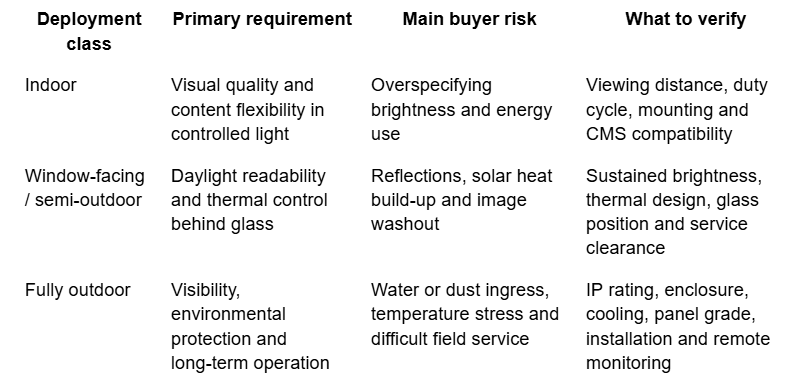
The IEC explains that ratings defined under IEC 60529 grade an enclosure’s resistance to dust and liquids. An IP code is useful evidence, but it is not a complete outdoor specification. Buyers still need to verify cable entries, door seals, drainage, ventilation, mounting and what happens when a technician opens the enclosure on site.
4. Separate peak brightness from sustained readability
The highest brightness figure is not automatically the best choice. Higher output increases heat and power demand. In a window installation, solar load can also raise internal temperature even when the display remains indoors.
B2B buyers should ask four questions:
Is the quoted figure typical, minimum or peak brightness?
Under what ambient temperature and duty cycle was it measured?
How does the system manage backlight output and internal heat over time?
What monitoring or compensation exists if brightness or temperature drifts?
This is where panel grade, optical structure, thermal path and enclosure design become more important than a headline number. A display that starts brightly but cannot manage heat may lose readability or require more service later. The specification should describe the operating condition under which brightness is maintained, not just the highest value reached in a test.
5. Treat placement and creative as one system
A high brightness display does not correct a poor sightline. A screen placed too high, too far inside the store or behind strong reflections may generate little useful attention regardless of resolution.
The creative also has to match the exposure time. A person passing a shopfront may have only a few seconds to understand the message. One product, one benefit and one action usually work better than a dense multi-zone layout. Large type, strong contrast and restrained motion improve comprehension. Detailed specifications and long disclaimers belong on channels where the viewer has time to read.
Window and in-store screens should not automatically use the same asset. A window screen interrupts and attracts. An in-store screen can support comparison, product education, wayfinding or assisted selling. The content plan should reflect those different jobs.
6. Distinguish CMS from remote device management
Multi-site retailers need two operating layers. A content management system and a remote device management system are related, but they are not substitutes.
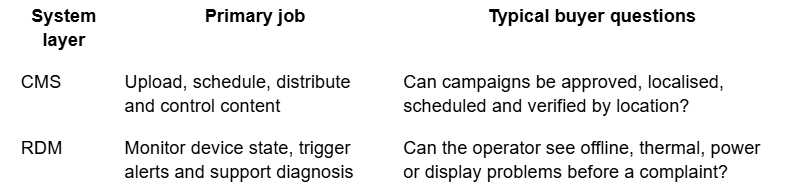
A campaign can be correctly scheduled while the screen is offline or overheating. Conversely, a healthy device can show expired content if publishing controls are weak. Buyers should define who owns each layer, how alerts are escalated and what evidence confirms that the right content is visible on a healthy screen.
For connected display networks, NISTIR 8259A identifies device capabilities such as identification, configuration, data protection, software update and cybersecurity state awareness as a baseline for IoT acquisition discussions. A retail signage RFQ does not need to become a full security audit, but it should ask how remote access, updates, credentials and event records are controlled.
7. Build a pilot that can answer a commercial question
A pilot should test the operating model, not merely prove that a screen can turn on.
Use a simple five-step process:
Set a baseline. Record the existing result before installation, such as entry rate, promoted-item sales, campaign change time or print replacement cost.
Choose a comparison. Use a similar location or an earlier operating period where possible.
Test real conditions. Run the screen through peak daylight, busy trading hours and the expected content schedule.
Record operational effort. Track publishing time, alerts, local staff intervention and service calls.
Define the scaling gate. Agree in advance what result, uptime and support burden justify a broader rollout.
This keeps the decision tied to a business outcome. It also prevents a visually impressive pilot from hiding a workflow that will be expensive across 50 or 500 locations.
8. Calculate lifecycle cost, not only purchase price
The hardware quote is only one part of total cost of ownership. Installation, structural work, electricity, connectivity, content production, software, field service, spare parts and downtime all affect the business case.
A cheaper display can become the more expensive option if it requires blind site visits, loses readability during peak daylight or has no practical route to replacement parts. For international and multi-site projects, response time and service access can matter as much as the panel specification.
Procurement teams should request:
expected duty cycle and operating-temperature range;
warranty scope and exclusions for the intended environment;
component and spare-part availability;
remote diagnostic and update capability;
incident escalation and service response process;
evidence of relevant certifications; and
a clear division of responsibility between supplier, integrator and retailer.
9. Avoid the most common procurement mistakes
Buying by nits alone. Brightness does not explain reflections, heat management or readability over time.
Treating an IP rating as the whole outdoor design. The enclosure rating does not replace correct cable, drainage, cooling and service design.
Assuming CMS means the device is monitored. Content control cannot confirm that the physical screen is healthy.
Using showroom creative for the real window. Fine text and dense layouts often fail at pedestrian viewing distance.
Scaling before service ownership is clear. Alerts have little value if nobody is responsible for acting on them.
10. Use this RFQ checklist before rollout
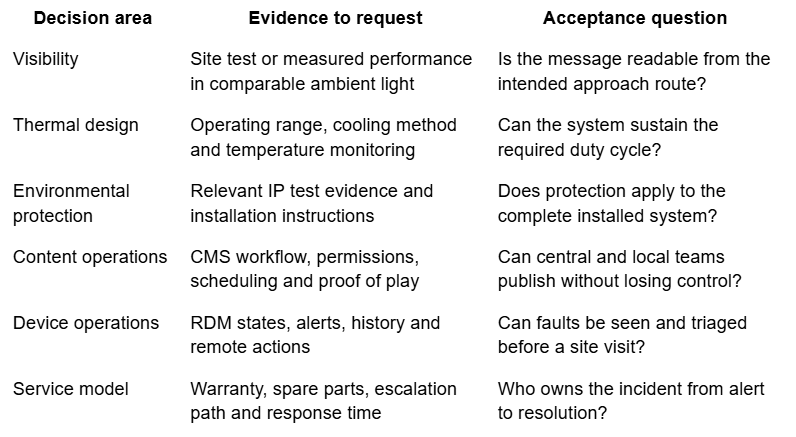
From a screen purchase to an operating asset
The B2B case for high-brightness retail signage rests on four linked decisions: the site must justify the display class, the thermal and enclosure design must support the duty cycle, the content and device layers must be governed separately, and the service model must work at rollout scale.
Retailers and integrators evaluating retail digital signage solutions should compare suppliers on those operating questions, not only on size, resolution and initial price. The useful outcome is not a brighter object in the window. It is a display network that can be seen, controlled, maintained and measured.
About MWE
MWE (Make Win Easy) is the hardware brand of Marvel Tech Group Co., Ltd., a commercial display solution expert and industrial-grade hardware manufacturer serving DOOH, smart city infrastructure, retail and system integration markets. Its commercial display portfolio includes indoor systems, high-brightness window displays, outdoor LCD displays and LED solutions.
According to the company’s approved product and system information, MWE outdoor display infrastructure covers 2,500–5,000-nit, IP65 solutions designed for 24/7 operation. Its group-level CMS connects approximately 75,000 devices, while RDM/OMC manages approximately 50,000 outdoor LCD devices. CMS handles content publishing and management; RDM/OMC handles device monitoring and operational support.
Source notes
Mordor Intelligence, U.S. Digital Signage Market Report 2026–2031.
ISO 9241-307:2008, Analysis and compliance test methods for electronic visual displays.
IEC 60529, Degrees of protection provided by enclosures (IP Code).
NISTIR 8259A, IoT Device Cybersecurity Capability Core Baseline.
MWE approved corporate, product and system information, reviewed July 2026.