The seven most powerful GIS mapping platforms for businesses
Business decisions get sharper when you can see your data on a map. Sales territories, delivery routes, customer clusters, and service coverage all become easier to plan when they are visualised geographically. That is why GIS mapping platforms have become essential tools for companies that rely on location data.
But picking the right platform is tricky. Some tools are built for developers who want to code custom applications. Others are designed for enterprise teams with dedicated GIS specialists. And a few are made for regular business users who need quick, actionable maps without a steep learning curve.
This guide breaks down seven of the most capable GIS mapping platforms available right now. Each one serves a different purpose, and understanding those differences will help you choose the tool that fits your team's workflow, budget, and technical skills.
Maptive: The Complete Solution for Business Mapping
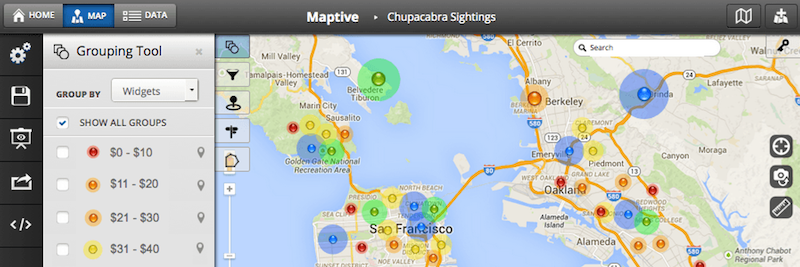
Maptive is a cloud-based mapping platform that turns spreadsheet data into interactive, customizable maps. If your team works with location data stored in Excel files, Google Sheets, or CRM systems, Maptive lets you upload that information and visualie it within minutes.
The platform does not require coding knowledge or GIS training. You import your data, and Maptive handles the rest. This makes it particularly useful for sales teams, logistics managers, and operations departments that need quick insights without waiting for IT support.
What Makes Maptive Work for Businesses
Maptive supports CSV, Excel, and Google Sheets formats, which covers how most companies already store their location data. Once uploaded, you can create several types of maps depending on what you need to see.
Heat maps show where your data points cluster together. If you are tracking customer locations, for example, a heat map reveals high density areas at a glance. Territory maps let you define sales regions and assign them to team members. Route optimisation helps delivery and field service teams plan efficient trips between multiple stops, with turn-by-turn directions accessible on mobile devices.
One feature that saves time is the built-in demographic data from the US Census. You can overlay population density or median household income by zip code onto your maps. This is helpful for site selection, market analysis, or understanding the characteristics of your service areas without having to source that data separately.
Integrations and Pricing
Maptive connects directly with popular CRM systems including Salesforce, HubSpot, and Zoho. This eliminates the manual work of exporting data from one system and importing it into another. Your maps stay current as your CRM data updates.
Pricing starts at $250 for a 45-day pass, which includes user licenses and a set limit of locations per map. Annual subscriptions range from $1,250 to $2,500 and come with higher geocoding limits each month. A 10-day free trial is available without requiring a credit card, so you can test the features before committing.
Support is available through live phone, email, and chat for both paying customers and trial users. This is worth noting because some platforms only offer support documentation or community forums unless you are on an enterprise plan.
Real-World Applications
One verified user described how Maptive allowed them to compile thousands of data cells into maps showing electric vehicle distributions by zip code, along with Tesla Supercharging Station locations displayed as heat maps. This kind of analysis would take considerably longer with a general purpose spreadsheet tool or a more technical GIS platform.
The strength here is accessibility. Teams that need to make location-based decisions quickly can do so without specialised training or technical resources.
eSpatial: Ideal for Unlocking Business Insights
eSpatial is a cloud-based business mapping software platform designed to turn flat spreadsheet and CRM data into visual, interactive maps for business.
It enables companies to visualise and analyse market data, build optimised sales territories, and plan efficient field routes without requiring any GIS training, while offering an accessible, affordable price.
How eSpatial’s GIS Works
Data Upload: Import address or coordinate lists instantly from Excel spreadsheets, ERP databases, or sync directly with Salesforce.
Visualisation: Plot data points as territory maps, route maps, pin maps, heat maps, bubble charts, or regional colour coded boundary layers.
Analysis & Action: Run radius, drive-time, or nearest neighbour calculations to uncover patterns, optimise and balance territory workloads, and export polished presentations.
What Sets eSpatial Apart
Zero Steep Learning Curves: Build interactive maps in minutes. Designed for everyday business users rather than specialised cartographers or data scientists.
High-Capacity Engine: Renders hundreds of thousands of data points smoothly on a single map without system lag.
Advanced Territory Optimisation: balance territories on any KPI or use a workload index
Included Onboarding: Offers direct, human customer support and training without charging hidden professional service fees.
Best Fit For
Sales Ops Teams: Rebalancing territories and clustering high-value accounts.
Field Operations & Logistics: Optimise multi-stop routes, reduce travel time, and identify new sites or underserved markets.
Marketing Analysts: Visualising customer density or identifying geographic service gaps.
ArcGIS by Esri: Enterprise Grade Power at a Premium Price
Esri's ArcGIS is the industry standard for professional GIS work. Government agencies, utilities, and large corporations rely on it for everything from urban planning to environmental monitoring. The platform offers tools for analysis, data management, and map creation that go far beyond what most business users will ever need.
Capabilities and User Types
ArcGIS Enterprise comes with six different user type licenses that align with specific workflows: creating maps, conducting spatial analysis, managing data quality, and making data driven decisions. Organisations choose their licence level based on team size and required capabilities.
The ArcGIS Business Analyst Web App provides tools for site analysis, market research, and infographics. Esri maintains global data covering more than 170 countries with over 15,000 variables, which is useful for multinational operations.
Service credits are consumed when using cloud-based features like geocoding, hosted services, or spatial analysis. This pay-per-use model can add up quickly depending on how heavily your team uses these functions.
Licensing Options
ArcGIS Enterprise is available in Standard, Advanced, and Kubernetes configurations. Purchases are made through Esri's sales team, and each option bundles a specific number of Creator and Viewer user licenses.
Special pricing is available for nonprofits, NGOs, and educational institutions at K-12, vocational, and higher education levels.
Consider the Cost
Multiple user reviews mention that ArcGIS pricing puts it out of reach for small businesses. One reviewer noted that with their needs, QGIS proved more efficient and cost-effective. This is a common sentiment among smaller organisations that do not require enterprise level GIS capabilities.
ArcGIS makes sense for large organisations with dedicated GIS staff and complex spatial analysis requirements. For most business teams that need simple mapping and visualisation, the platform may be more than necessary.
Mapbox: Built for Developers Who Need Custom Maps
Mapbox takes a different approach. Instead of providing a ready-made mapping application, it offers APIs and SDKs that developers use to build custom location features into websites, mobile apps, and other software.
If your company has engineering resources and wants to create a unique mapping interface for customers or internal users, Mapbox provides the building blocks.
How Mapbox Works
Mapbox GL JS is a JavaScript library for creating vector maps on the web. Developers use it to build interactive, responsive maps that load quickly and can be styled to match any brand or application design.
The platform includes geocoding for converting addresses into coordinates, store locators, turn-by-turn navigation, and data visualisation tools. All of these are accessed programmatically through APIs rather than through a point-and-click interface.
Mapbox Studio is a browser-based tool for styling maps and managing hosted data. Designers and developers use it to customise the look of their maps before deploying them.
Pricing Structure
Most Mapbox products are priced based on monthly usage without upfront licenses or contracts. A free tier includes 50,000 map loads per month, which works well for small projects or businesses with limited web traffic.
As usage grows, volume pricing applies automatically. There is no need to negotiate new contracts when your traffic increases.
Best Fit
Mapbox is ideal for technology companies and startups building location-based products. If you need to embed maps into a customer facing app with a custom design, Mapbox gives you full control over the result.
For business teams without development resources, Mapbox will not be practical. The platform assumes you have engineers who can write code and integrate APIs into your existing systems.
CARTO: Cloud Native Spatial Analytics
CARTO positions itself as a location intelligence platform for data scientists and analysts. It runs on cloud data warehouse platforms including Google BigQuery, Snowflake, AWS Redshift, and Databricks, making it a good fit for companies that already store large datasets in these systems.
Analytics Tools
The Analytics Toolbox within CARTO includes more than 100 spatial functions organised into modules for tiling, clustering, data processing, and statistics. Data teams use these functions to run complex spatial queries and build predictive models based on location data.
CARTO is designed for users who are comfortable working with SQL and data warehouse environments. The platform integrates with existing cloud infrastructure rather than requiring data to be exported into a separate mapping tool.
Pricing and Trial
CARTO pricing starts at $149. A 14-day free trial provides access to all components, including demo datasets and a CARTO Data Warehouse instance for evaluation.
Marketplace payment options are available on major cloud platforms, which simplifies procurement for organizations that already have cloud spending agreements in place.
Use Cases
Companies like Coca-Cola, Vodafone, JLL, and Deliveroo use CARTO for delivery route optimisation, behavioral marketing analysis, and store placement decisions. The platform is aimed at organisations that treat spatial data as a strategic asset and have the technical staff to work with advanced analytics tools.
For teams without data science capabilities, CARTO's learning curve may be steep.
Felt: AI Powered End-to-End GIS Solution
Felt is a cloud-based GIS mapping software that brings a modern approach to online GIS mapping through AI powered spatial intelligence. It allows enterprise teams to create maps, apps, and dashboards 6x faster and collaborate on them in real-time.
What sets Felt apart
Felt's intuitive and powerful solution allows you to build interactive maps and applications with just a prompt, bringing your data insights to the forefront and allowing you to immediately share them internally and externally.
Trial
You can access the full capabilities of modern GIS through a free seven-day trial to explore how it can be used by your team.
Best fit
Used across 15 industries, Felt allows teams in real estate, climate, utilities, construction, investment, and finance to transform how modern enterprises integrate spatial data into their decision-making, delivering solutions that teams love to use.
QGIS: Free and Open Source GIS
QGIS is a desktop GIS application that is completely free to download and use. It runs on Windows, macOS, and Linux, and supports viewing, editing, analysing, and exporting geospatial data in many formats.
What QGIS Offers
The software handles raster, vector, mesh, and point cloud layers. It supports shapefiles, personal geodatabases, DXF, MapInfo, PostGIS, and other industry standard formats. Web services like Web Map Service and Web Feature Service are also supported.
QGIS includes tools for vector analysis, raster analysis, sampling, geoprocessing, and database management. Users can access the complete GRASS functionality through integrated tools, adding more than 400 analytical modules.
A plugin library extends the software's capabilities, and an active community provides documentation and troubleshooting support.
The Trade-Off
QGIS is used approximately 800,000 times daily worldwide, according to project statistics. Users appreciate its flexibility, cost savings, and compatibility with various data formats and operating systems.
However, reviewers consistently note that the software can be overwhelming for beginners. The learning curve is steep, and performance may slow with large datasets or complex operations. Some advanced features require more technical expertise than the average business user possesses.
Which Platform Fits Your Needs
Maptive works best for business users who need to visualise location data quickly without technical training. Its CRM integrations, built-in demographics, and a powerful interface make it practical for sales, marketing, and operations teams.
The right choice depends on your team's skills, your budget, and what you actually need to accomplish with your location data. For most business teams looking for quick, actionable maps without a technical lift, Maptive provides the most accessible path forward.